
Sharing, links and downloads
Share a report with signed-in viewers or anyone with a link, embed it in a website, or download it.
For: Admins and developers Where: A report → Share / Download
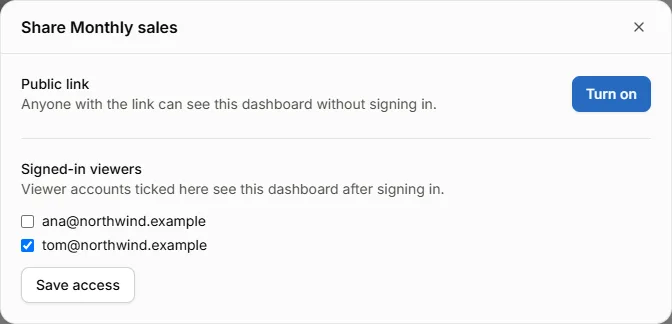
Share with people who sign in
Choose Share. Under Signed-in viewers, tick the viewer accounts that should see the report after signing in.
A public link
Under Public link, anyone with the link can see the report without signing in. Copy the link or the embed code for a website, and Turn off the link at any time.
- Link settings builds a link that opens the report the way you want: without the header, with filters already chosen, fitted to one screen, with the filters in a side panel, or with a Back button.
- Signed links are for embedding in your own app: the plain link stops working, and only links signed with a secret open the report. A signed link can require filters, such as the customer’s own region, so a mistake never shows every row.
Public visitors never see who owns the report or any SQL.
Download
Download offers Detailed report (PDF): the charts and numbers, then every table in full (up to 5,000 rows each), running across pages with the column headings repeated, and the report’s name and page number at the foot of each page. Dashboard on one page (PDF) is the whole report as it looks, like a screenshot. Excel has one sheet per widget with its data. A card at the top right shows each download’s progress, with the report’s name; you can keep working while it runs. The filters you chose and your data access apply to every download. In the PDF, information notes on widgets are printed under their titles.
Templates
In Edit, the blue bar’s ⋯ menu has Save as template, which offers the report to everyone as a starting point, with a Template name, Category (such as Sales) and What it shows. Others use it with From a template in a directory.